
Monday morning starts with three paralegals buried in three provider portals. Two CDs are missing in the mail. Defense counsel wants the treatment file under a tight deadline, and the emergency-room chart that could explain the client's damages still hasn't surfaced.
That isn't a clerical inconvenience. It's a litigation operations failure. At a high-volume personal injury firm, fragmented medical records storage creates inconsistent file formats, unreliable chronology, unverified treatment gaps, duplicate downloads, and avoidable spoliation risk. Every weakness appears later in the workflow, usually when a demand package, expert review, deposition, or trial exhibit list is already due.
The firms that handle this well treat medical records as the case's most critical evidence. They build storage around retrieval, auditability, preservation, and controlled access, not around whichever folder structure a vendor demonstrates. The payoff is practical: a paralegal can find the orthopedic records across multiple providers, a demand drafter can verify the treatment sequence, and litigation counsel can show who accessed or exported a document.
The Medical Records Problem Every PI Firm Eventually Faces
A personal injury file rarely arrives as a clean digital package. It comes through provider portals, secure messages, fax machines, mailed discs, email attachments, paper authorizations, billing systems, and client uploads. Each source uses different naming conventions and document structures. One provider sends a searchable PDF, another sends scanned images, and a third separates clinical notes from billing records without explaining the relationship.
At low volume, staff can compensate with memory and manual work. At scale, that approach breaks. A missing emergency-room chart can conceal the first documented complaint, a later diagnosis, or a treatment connection that changes the demand narrative. A duplicate record can inflate review time. An untracked gap can weaken causation analysis. A misplaced original can create questions about preservation and chain of custody.
Storage is part of the litigation workflow
Most firms still assign medical records to a clerical queue. Someone downloads the files, renames a few documents, and places them in a case folder. The file looks complete until an attorney asks a precise question: Which provider first documented the shoulder injury? What happened between the emergency visit and the orthopedic evaluation? Where is the imaging report that corresponds to the billing entry?
Those questions expose whether the firm has a storage system or merely an archive. A useful system supports:
- Chronology building: Preserve dates of service, provider identity, document type, and source information in searchable fields.
- Demand drafting: Let the drafter locate treatment, diagnoses, imaging, restrictions, and billing evidence without opening every file.
- Expert preparation: Give experts a complete, ordered record set with obvious gaps flagged for review.
- Trial readiness: Preserve access history, document versions, exports, and litigation holds so the file can withstand scrutiny.
Operational rule: If a paralegal can't answer “what happened, when, and who documented it?” from the storage system, the firm is paying for storage without receiving litigation value.
The right design begins before migration. Assign ownership, define the record taxonomy, standardize intake, and decide how the firm will handle missing records. Storage should make the next litigation task easier, not just preserve the last download.
Storage Architectures That Fit a Personal Injury Practice
Think of the architecture as the firm's case-file cabinet. An on-premises system keeps that cabinet inside the firm. A cloud-native SaaS platform places it in a remote, professionally managed vault. A hybrid model keeps the active index and frequently used material close to the team while placing larger archives or backup copies elsewhere.
On-premises storage gives the firm direct control over hardware, network configuration, and migration timing. It can deliver predictable performance for active matters, but the firm owns the maintenance, backup design, security work, replacement cycle, and recovery plan. That burden becomes difficult when records arrive faster than the infrastructure was designed to handle.
Cloud-native SaaS usually fits solo and small practices better because the provider manages infrastructure and scaling. The managing partner must still evaluate security, data location, export rights, uptime commitments, and the vendor's willingness to sign a Business Associate Agreement. A cloud platform is not automatically compliant just because it has a polished interface.
Hybrid storage often suits mid-size firms with a substantial active docket and a need for controlled archives. It can offer fast local access for current demand work while using cloud repositories for backup or less frequently accessed material. The trade-off is operational complexity. Staff must understand which copy is authoritative, how synchronization works, and what happens when the firm leaves the platform.
Before reviewing vendors, use this guide to choosing the right cloud storage for your business to frame the broader questions around scaling, access, and vendor dependence.
Storage architectures compared for PI firms
| Dimension | On-Premises | Cloud-Native SaaS | Hybrid |
|---|---|---|---|
| Control | Direct control of infrastructure and access | Vendor-managed infrastructure with contractual controls | Shared control across local and cloud environments |
| IT burden | Highest, including hardware, updates, backups, and recovery | Lower internal burden, but vendor oversight remains essential | Moderate to high because two environments must stay aligned |
| Scaling | Requires capacity planning and purchases | Usually easier to expand as the docket grows | Flexible, but integration and synchronization require discipline |
| Retrieval | Fast on a well-designed local network | Dependent on connectivity and platform performance | Fast for active local material, broader access through cloud archives |
| Migration risk | Firm controls the data, but owns conversion work | Export format, fees, and vendor cooperation matter | Multiple systems can make exit and reconciliation harder |
| Best fit | Large firms with dedicated infrastructure expertise | Solo and small firms seeking operational simplicity | Mid-size firms balancing active work and long-term archives |
Choose the architecture that matches the firm's intake, review, demand, and trial workflow. Don't let a vendor's feature deck decide where the evidence lives.
HIPAA Controls You Actually Have to Configure
HIPAA compliance starts with configuration, not a label on a storage proposal. The settings determine who can open a medical record, how the firm detects misuse, and whether it can reconstruct events during discovery or a spoliation dispute. Security Rule documentation must be retained for at least six years from the date created or last in effect. Keep that requirement in the firm's compliance schedule, without confusing it with the separate retention rules for clinical files.
For a PI firm, compliance documentation belongs in a controlled repository apart from ordinary medical records. Policies, risk assessments, Business Associate Agreements, breach records, access logs, and training records need defined owners, review dates, and retention logic. That structure supports demand drafting and later proves who handled evidence when a file is challenged.
Configure the controls around real users
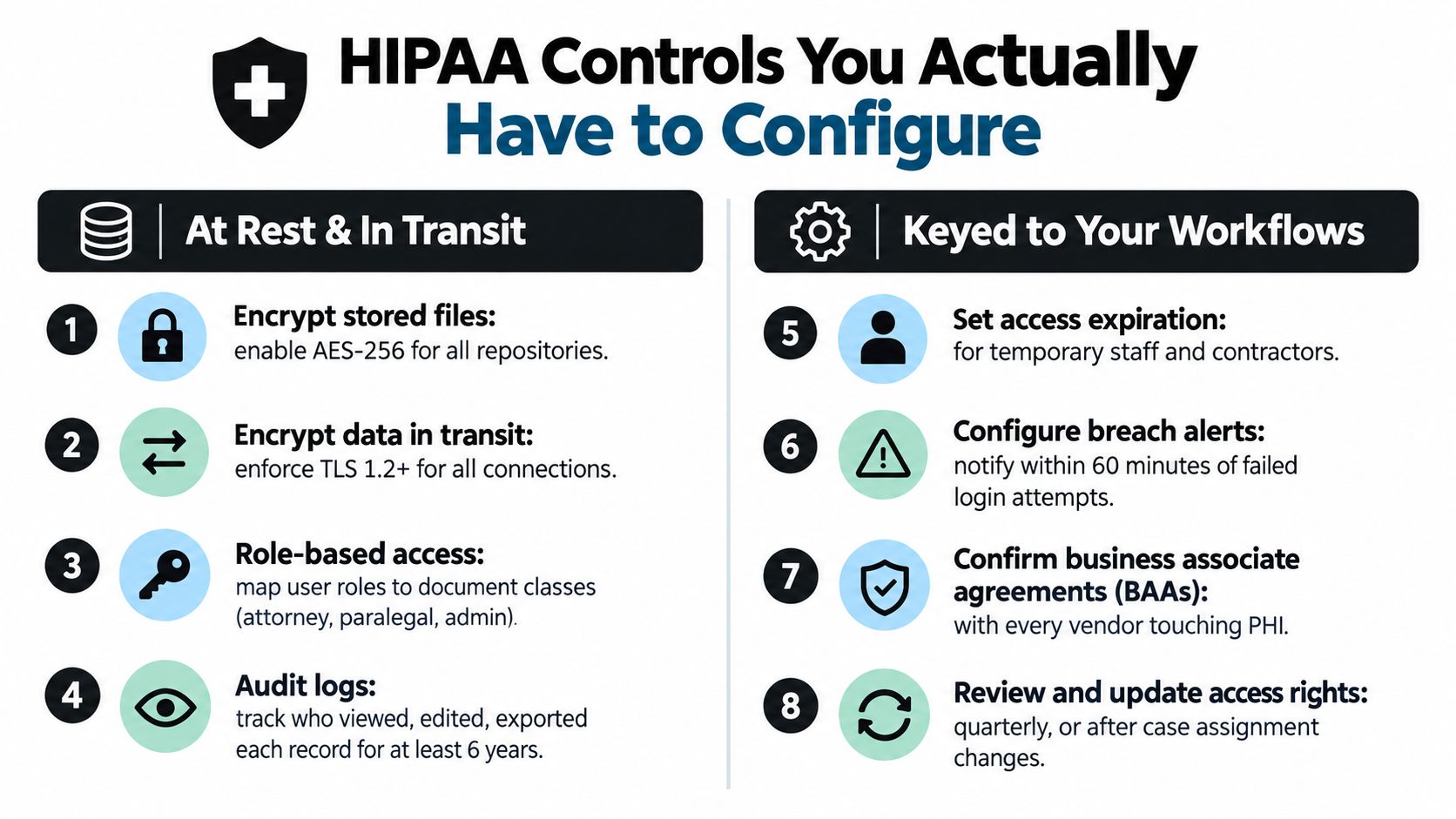
Use encryption at rest and in transit. Strong modern encryption, commonly AES-256 for stored data and TLS 1.2 or later for transfers, gives the firm a defensible technical baseline for electronic PHI. Store keys separately, and protect logs and backups as sensitive data.
Map permissions to the litigation team. A paralegal assigned to a case may need broad access to provider records, chronology materials, and demand exhibits. A billing administrator may need financial documents only. Give temporary staff and contractors time-limited access, never permanent membership in a shared folder. Require MFA, session timeouts, mobile-device controls, and remote-wipe capability where available.
Audit logs should record viewing, editing, exporting, permission changes, and deletion attempts. A log nobody reviews shows collection, not control. Review access quarterly and whenever responsibility for a case changes. Those reviews can also expose unusual downloads before they affect a demand package or a multi-provider chronology.
Any vendor handling PHI needs a signed Business Associate Agreement. Include OCR, translation, hosting, backup, and e-discovery providers in that review. Use compliance strategies for healthcare pipelines to assess vendors positioned between the firm and its storage platform. For document-management design, review HIPAA-compliant document management with the vendor's security documentation.
Document the breach-response path, name decision-makers, preserve relevant logs, and run a breach exercise annually. Controls matter when staff can follow them under pressure, especially after an unauthorized export, a missing record, or a disputed evidence trail.
Retention, Disposition, and Litigation Hold Done Right
A demand package can expose a retention failure months after a file closes. If one provider record disappears, the chronology develops a gap, damages become harder to support, and the firm may face a spoliation argument. Retention must therefore follow the litigation workflow, not a single calendar date.
HIPAA does not establish one universal retention period for patient medical records. The applicable period depends on state law, provider type, patient age, federal program rules, the engagement file, and the needs of an active matter. The HIPAA retention requirements overview explains why overlapping obligations make a single deletion date unsafe.
Adopt the longest applicable rule, and separate clinical records from internal work product. Pediatric claims, wrongful-death matters, and asbestos or toxic-exposure cases may require longer preservation. A closed file can still contain records needed for an appeal, Medicare or Medicaid documentation, a lien dispute, or a later claim. The GRM's retention guidance supports keeping compliance documentation distinct from the patient record set.
Build retention by record class
| Record Category | Typical Minimum | Longest Applicable Rule | PI-Specific Note |
|---|---|---|---|
| Adult medical records | Often measured in years under state schedules | The longest applicable state, federal, contractual, or hold period | Preserve the complete provider set, not only records cited in the demand |
| Minor's records | Usually longer than adult schedules | State rules tied to majority and additional statutory periods | Do not start destruction as though the client were an adult |
| Medicare or Medicaid-related records | Program rules may impose their own period | The longer program, state, or litigation requirement | Keep secondary-payer and lien documentation with the claim history |
| Wrongful-death records | Claim and client circumstances control | Any longer limitation, repose, estate, or hold requirement | Preserve records for all relevant parties and beneficiaries |
| Toxic-exposure matters | Long-tail claim characteristics | Applicable statute of repose, state rule, and litigation hold | Archive provider changes, exposure history, and historical treatment |
| Internal compliance records | At least six years under HIPAA's documentation baseline | Longer firm policy or legal hold | Store policies, access logs, BAAs, and incident records separately |
At intake, record the jurisdiction, claimant age, claim type, payer involvement, and foreseeable dispute. During each disposition review, stop destruction for any matter with an open hold. Require dual authorization for destruction tied to an active claim, and maintain a log showing the record class, approval, method, date, and certificate.
Use a documented hold process
Start the hold workflow with an intake checklist covering potentially relevant medical records and custodians. Issue written notice naming the custodians, systems, providers, and record categories involved. Send periodic reminders, document acknowledgments, and release the hold only after the responsible attorney confirms that the matter and related obligations have ended.
Apply the hold to the complete provider set, not just documents already cited in a demand. That preserves the records needed to identify treatment gaps, reconcile multi-provider chronology, and defend the firm's evidence trail.
Keep the client's original medical records separate from the internal case file. They can have different retention clocks and different evidentiary roles. For operational guidance, review how long medical records must be kept.
Indexing and Retrieval That Save Paralegal Hours
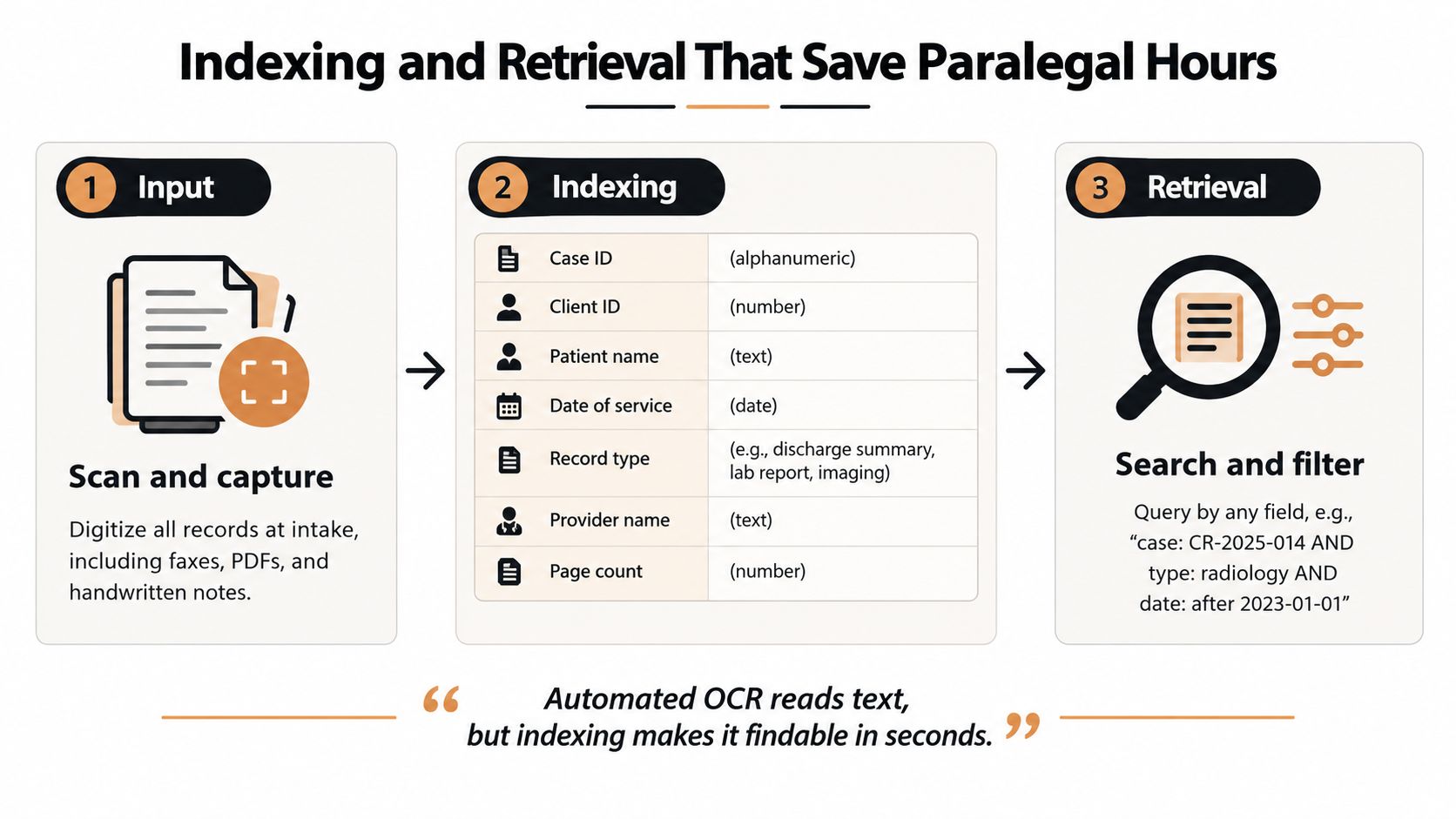
A storage repository becomes valuable when a paralegal can query it without remembering a provider's filename convention. Start with a fixed metadata schema that works across every case and provider:
- Case identity: Case ID, client ID, patient name, jurisdiction, and assigned team.
- Provider data: Provider name, facility, specialty, and taxonomy such as emergency medicine, primary care, orthopedics, imaging, physical therapy, or pharmacy.
- Document descriptors: Date of service range, record type, page count, source, and whether the document is original, produced, or derivative.
- Litigation fields: Body region, diagnosis category, relevance designation, privilege status, Bates range, and gap-flag status.
OCR should process paper intakes, faxed records, and image-only PDFs at ingestion. OCR makes text readable, but metadata makes the record findable. Automated Bates numbering should occur only after the firm establishes the authoritative production set, so duplicate downloads and working copies don't create competing page references.
Make gap spotting a first-class feature
Use a standardized folder structure such as:
- 01_Intake
- 02_Providers
- 03_Demand
- 04_Litigation
- 05_Settlement
- 06_Closure
Folders provide orientation. Tags provide the retrieval engine. A demand drafter should be able to search for every orthopedic record across all providers, filter by date, identify imaging, and review the related billing without opening unrelated emergency or pharmacy files.
The highest-value dashboard surfaces treatment intervals that exceed the firm's configured review threshold. That doesn't prove the client stopped treating, but it tells the paralegal where to request missing records, ask the client a targeted question, or explain a pause in the demand. The system should also distinguish an actual treatment gap from a missing document gap.
For workflow ideas on structuring the file, see how to organize medical records.
Disaster Recovery and Business Continuity for Case Files
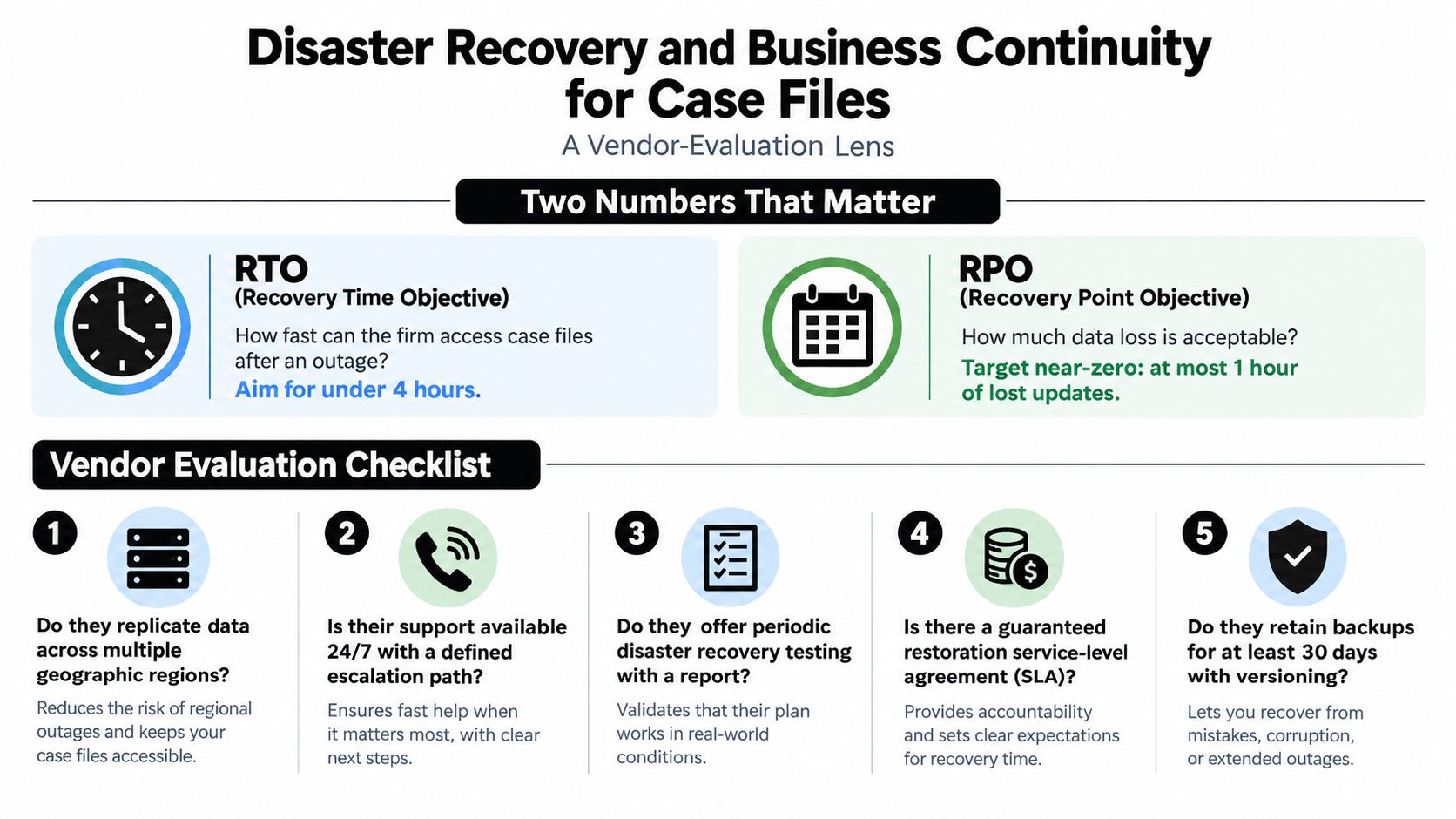
Disaster recovery belongs in vendor evaluation, not in an IT binder that nobody opens. The two measures that matter are Recovery Time Objective, how quickly the firm can access case files after an outage, and Recovery Point Objective, how much recent work the firm can afford to lose.
Those objectives should reflect actual litigation events. A server-room flood, ransomware incident, regional SaaS outage, or failed laptop can occur the night before a deposition. The right response depends on where the authoritative copy lives, how frequently it replicates, whether backups are immutable, and whether staff can restore files without waiting for one overloaded administrator.
Score the recovery design, not the promise
Ask vendors to explain their architecture in operational terms:
- Immutable backups: Object-lock or WORM-capable repositories prevent attackers or compromised administrators from rewriting every recovery copy.
- Geographic redundancy: Replication across separate regions reduces dependence on one facility or local disaster zone.
- Local snapshots: Encrypted snapshots can provide fast recovery for active matters when the primary application is unavailable.
- Version history: Versioned backups help recover a file after accidental deletion, corruption, or an incorrect bulk update.
- Restore testing: A backup that hasn't been restored is an assumption. Require documented tests that include actual paralegal retrieval.
The firm should run a tabletop exercise, a full restore from backup, and a simulated provider failover annually. Paralegals should participate because they know which records and searches the litigation team needs. Test whether the recovered files preserve metadata, audit history, Bates references, permissions, and hold status.
Business continuity also protects client confidence. If medical records become unavailable, the firm may miss a response deadline, lose access to a chronology, or struggle to explain what happened to a critical exhibit. A working recovery plan preserves the evidence workflow, not merely the underlying bytes.
A Vendor Selection Checklist for Medical Records Platforms
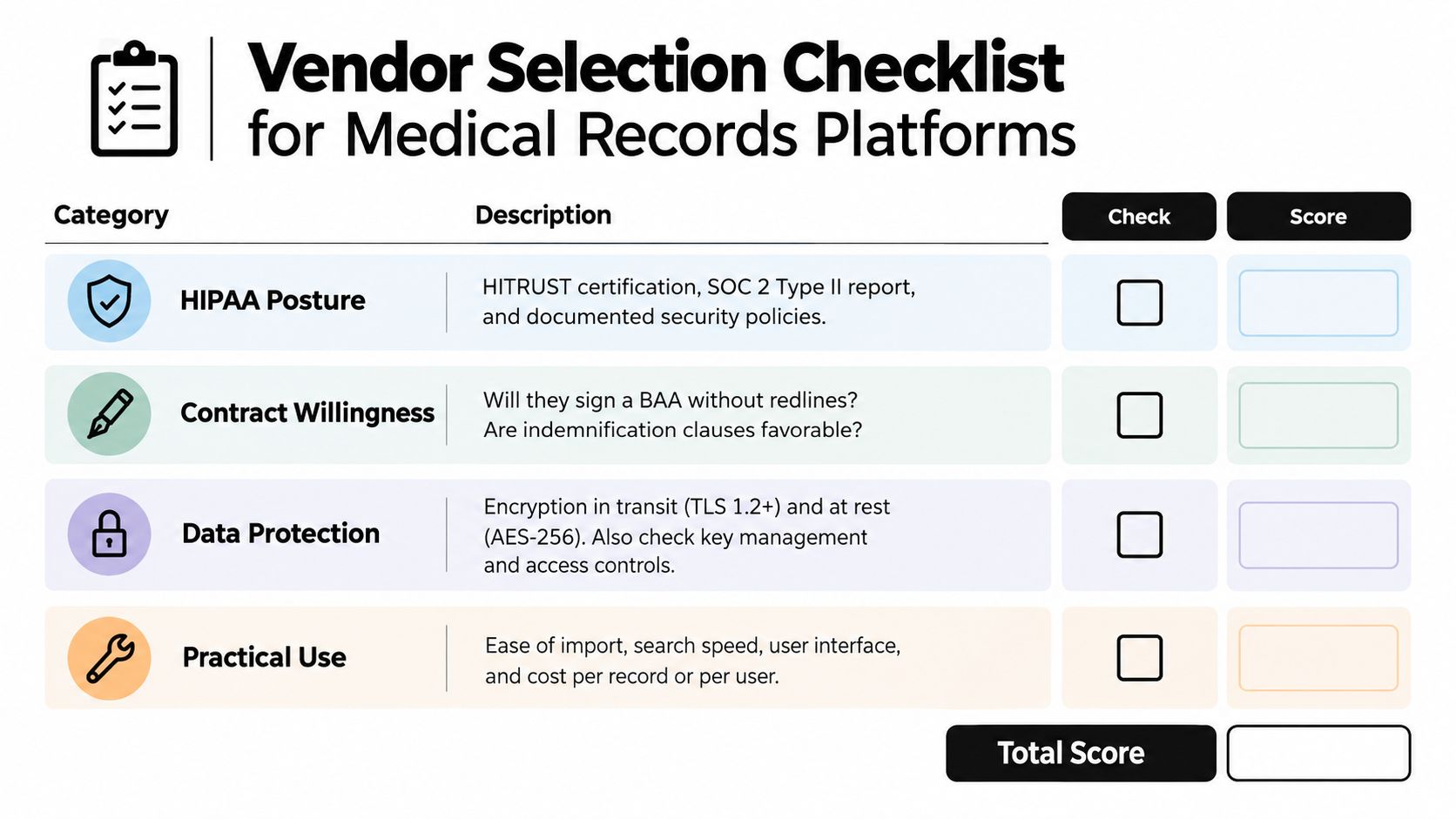
Treat every vendor demonstration as a controlled test. Don't reward a polished interface until the platform proves that it can ingest the firm's actual record mix, enforce access restrictions, preserve an audit trail, support holds, and export data in a usable format.
Use a one-to-five score for each category, with written comments and a named evaluator. The number is only useful if the same questions go to every finalist.
Test the security posture
Ask for the vendor's security policies, independent assurance reports, incident history, encryption details, key-management model, access controls, logging design, and recovery documentation. Confirm that the vendor will sign a BAA before uploading PHI. Ask whether subcontractors, including OCR and translation providers, are covered by the same obligations.
The platform should let administrators create roles by case team and document class. It should record viewing, downloading, editing, exporting, sharing, and deletion activity. Require a demonstration with a test user whose access is revoked mid-matter.
Read the contract before the pilot
Contract terms often create more risk than missing features. Check:
- Renewal language: Identify auto-renewal deadlines and price-change rights.
- Exit assistance: Confirm export formats, timing, fees, metadata preservation, and help with migration.
- Subprocessors: Require a current list and notice of material changes.
- Deletion: Determine whether “deleted” records disappear immediately, enter a recoverable state, or remain in backups.
- Liability and indemnity: Align responsibility with the vendor's role in handling PHI and preserving data.
- Support: Confirm escalation paths and whether urgent access problems receive human response.
Run a representative test
Upload paper scans, faxed PDFs, billing files, imaging reports, and records with handwritten notes. Search by provider, date, body region, and document type. Create a hold, export a production set, revoke a user, restore a deleted test file, and inspect the audit record.
For a firm that wants AI-assisted organization in addition to controlled medical records storage, Ares provides secure upload, encrypted storage, medical record review, chronology generation, and demand-draft workflows for PI files. Evaluate it against the same security, export, access, and usability criteria as every other platform.
Tying Storage to Litigation Outcomes and a 30-Day Rollout
Medical records storage should earn its place in the budget by improving litigation work. A searchable, indexed file lets the demand drafter verify the treatment narrative instead of relying on a partial packet. A structured chronology helps counsel identify causation questions and provider gaps before defense counsel does. An immutable audit trail gives the firm a stronger answer when someone challenges access, alteration, or destruction.
The rollout doesn't need to wait for a perfect enterprise implementation. It needs an owner, a narrow pilot, and rules that staff will follow.
Days one through seven
Inventory paper, portal downloads, discs, email attachments, shared drives, and existing case-management folders. Appoint one operations owner with authority to define the taxonomy and resolve conflicts. Identify which matters need immediate preservation because of active litigation, pending demands, or known record disputes.
Days eight through fourteen
Shortlist platforms and complete security review before uploading live PHI. Confirm BAAs, encryption, role-based access, audit logging, retention controls, export terms, backup design, and subprocessor obligations. Reject any vendor that refuses to demonstrate deletion, restoration, or access revocation.
Days fifteen through twenty-one
Pilot the system on five active cases selected for different record conditions, such as paper-heavy files, multi-provider treatment, imaging, and active litigation. Have paralegals perform the searches they use, then record failed queries, missing fields, OCR problems, duplicate records, and confusing permissions.
Days twenty-two through thirty
Train staff on intake, naming, tagging, holds, exports, and incident escalation. Finalize the retention and disposition policy. Migrate in waves by case type, beginning with active matters where retrieval and chronology work will produce immediate operational feedback.
Track outcomes that partners can understand:
- Time required to assemble a complete provider record set.
- Time required to locate a specific treatment event.
- Number of unresolved record or treatment gaps at demand review.
- Number of duplicate documents removed before attorney review.
- Time required to prepare expert or deposition materials.
- Percentage of active files with documented holds and access history.
The right system won't replace judgment. It gives attorneys a reliable evidentiary foundation on which to exercise judgment, negotiate from a stronger record, and prepare for trial without rebuilding the file from scratch.
If your firm is losing time to scattered portals, duplicate records, and manual chronology work, visit Ares to see how its secure platform organizes medical files, extracts case-ready insights, and supports demand drafting. Put it through the same pilot and security scorecard described above, then make the decision with evidence rather than another vendor demo.